
When you move a Lovable, Bolt, v0 or Base44 app to Hostwares, we ask for two values so your app can keep talking to the database it already uses. This is the step people get stuck on, so here it is in detail.
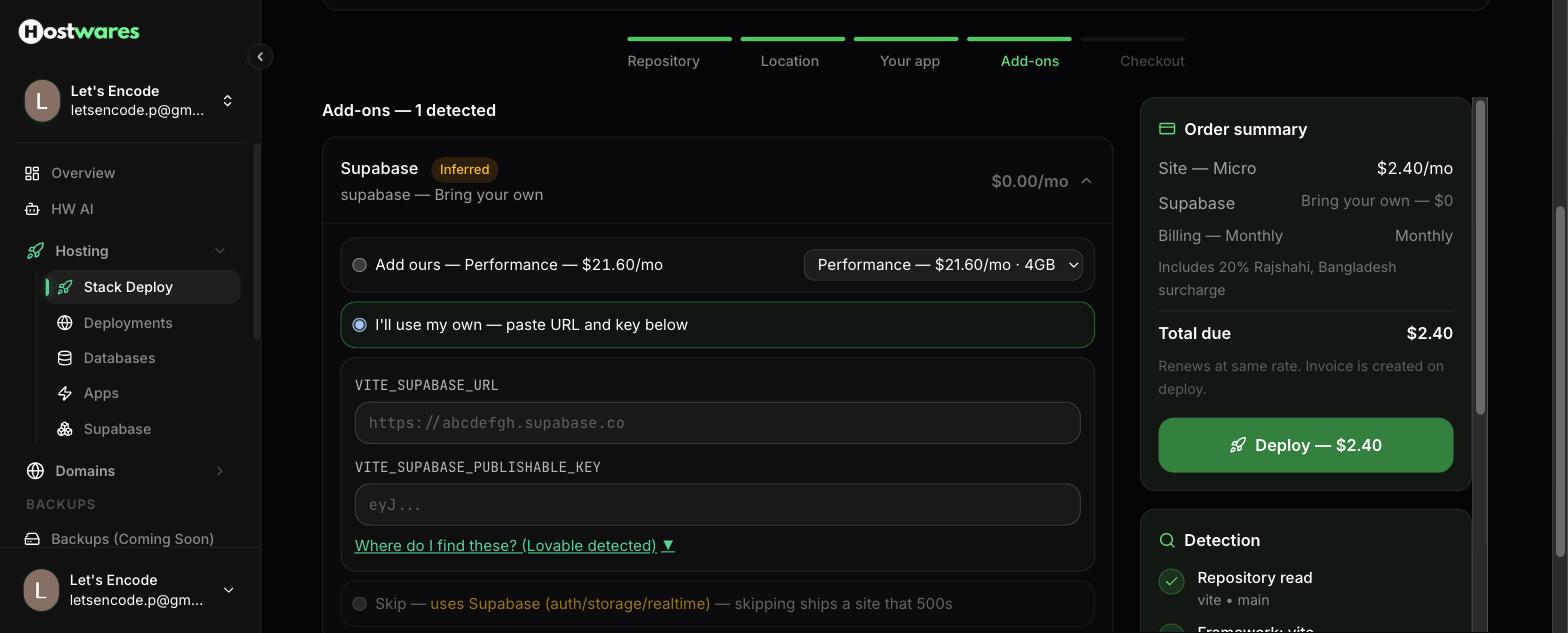
The two values
| Field | Looks like |
|---|---|
VITE_SUPABASE_URL | https://abcdefgh.supabase.co |
VITE_SUPABASE_PUBLISHABLE_KEY | a long string starting with eyJ |
The exact names depend on how your app was built — a Vite app uses the VITE_ prefix, a Next.js app uses NEXT_PUBLIC_. We read the names out of your own code and show you the ones your app actually asks for, so just fill in what is on screen.
Getting them from Supabase
- Open supabase.com/dashboard and select your project
- In the left sidebar, open Project Settings
- Click API
- Copy Project URL — that is your
..._SUPABASE_URL - Under Project API keys, copy the key labelled anon / public — that is your publishable key
Paste both into Hostwares and continue.
Use the anon key. Never the service_role key.
On the same Supabase page you will see a second key called service_role, usually behind a "Reveal" button. Do not use it here, and do not put it in any app that runs in a browser.
The difference matters:
- The anon key respects your Row Level Security rules. It can only do what you have allowed a visitor to do. It is designed to be shipped inside a front-end app where anyone can read it.
- The service_role key ignores every one of those rules. Anyone who gets it can read, change or delete every row in your database, no matter what your policies say.
If you paste a service_role key into Hostwares, we stop you and say so. That check is there because this is the single most common way a vibe-coded app leaks its entire database.
If you have already shipped a service_role key in a front-end app, treat it as compromised. Go to Project Settings → API in Supabase and roll the key, then update wherever the new one is needed.
Why we ask for these at all, instead of moving your database
Because moving your database is a risk you do not need to take.
Your Supabase project holds your tables, your logged-in users, your uploaded files and your auth settings. Keeping it exactly where it is means nothing can be lost in a migration, your users never have to log in again, and your free tier keeps working. We host the app; Supabase keeps doing what it already does well.
That is also why the price is what it is — you are only paying us for hosting.
Common problems
"URL must be https://<project-ref>.supabase.co" You have pasted something else — often the dashboard URL from your browser's address bar. The right value is on the Project Settings → API page, under Project URL.
"Key must be a JWT starting with eyJ" You have copied a project reference or a password instead of the key. The anon key is long and starts with eyJ.
"That's your secret key — use the anon / public key just above it." You copied service_role. Scroll up on the same page; anon is directly above it.
My app loads but shows no data The keys are right but your Row Level Security policies may not allow anonymous reads. That is a Supabase-side setting and it behaved the same way on your old host — check Authentication → Policies.
Still stuck? Email [email protected] with your site name. Support messages are free.